Answering the question, which heat-only smart thermostat is best for efficiency, installation ease, and smart-home compatibility? This guide highlights five top options focused on heating control, energy savings, and straightforward DIY setup. Each pick suits a distinct buyer: first-time smart-thermostat adopters, homeowners with heat-only systems, renters seeking easy installs, and those integrating with Alexa or Apple HomeKit. Below, a quick comparison table helps you decide at a glance.
| Product | Best For | Notes |
|---|---|---|
| Amazon Smart Thermostat | Alexa/Ring users seeking rebates | Simple setup; energy rebates may apply |
| Sensi Lite ST25 | Budget-friendly DIY installs | Common-wire required for some systems |
| ecobee Smart Thermostat Essential | Broad compatibility | Energy savings with scheduling |
| Honeywell Home T5 WiFi Thermostat | Geofencing and 7-day scheduling | Requires C-wire in many setups |
| Mysa Smart Thermostat LITE | Electric baseboard heating | Works with HomeKit, Alexa, Google |
Amazon Smart Thermostat – Save Money And Energy

The Amazon Smart Thermostat is designed to work with Alexa and Ring ecosystems. It aims to help reduce energy usage by adjusting heating and cooling based on temperature readings or presence via connected devices. The device notes potential energy rebates after purchase, which may lower overall costs. This option is best for buyers who want tight voice assistant integration and a straightforward setup aligned with their existing smart-home routines.
Best for: Alexa-centric households seeking easy integration and potential rebates. Limitations: Requires a C-wire for some configurations, and rebates vary by provider and location.
Sensi Lite Smart Thermostat, Easy DIY

The Sensi Lite ST25 focuses on quick DIY installation with a built-in level and simple steps. It is compatible with common HVAC configurations but some systems may require a C-wire, especially heat pumps or heat/cool setups. ENERGY STAR certification signals energy-saving potential through flexible scheduling, geofencing, and remote access. It’s a solid pick for practical, budget-conscious homes where straightforward setup matters.
Best for: DIY installers who want a budget-friendly, energy-conscious option. Caution: A C-wire may be needed for certain systems.
Sensi Smart Thermostat, Wi-Fi, DIY

The Sensi ST55 offers privacy protections and an easy DIY installation with a focus on HVAC compatibility. It generally does not require a C-wire in most applications, and its ENERGY STAR rating supports energy savings through flexible scheduling, remote access, and utilization reports. This model suits homes where privacy concerns and simple setup are priorities.
Best for: Users who prefer strong privacy controls and easy installation. Limitations: Some setups may still require a C-wire; verify compatibility with your system.
ecobee Smart Thermostat Essential

The ecobee Essential emphasizes compatibility and energy savings with an emphasis on automatic adjustments aligned to your schedule. It notes that up to 85% of systems are compatible, and it provides a color touchscreen for easy control plus ongoing software upgrades. This option is best when you want broad system compatibility and regular feature updates.
Best for: Homeowners with varied heating setups seeking broad compatibility and ongoing updates. Limitation: Verify system compatibility with ecobee’s checker before purchasing.
Honeywell Home T5 WiFi Smart Thermostat

The Honeywell Home T5 offers 7-day scheduling and geofencing, with Energy Star certification as part of its energy-saving credentials. This model is commonly chosen for its scheduling flexibility and integration with smart routines. C-wire compatibility is common, so users should confirm wiring before purchase. This option fits households that want dependable scheduling tied to real-time location data.
Best for: Homes that value flexible scheduling and location-based control. Limitation: Ensure a C-wire is available or plan for a power adapter if needed.
New Honeywell Home Smart Thermostat

This Honeywell model supports conventional and heat-pump configurations with a color touchscreen and multiple scheduling options. It is compatible with major voice assistants and is MATTER-certified per new trends, offering broad smart-home integration. C-wire is typically required for reliable operation. This thermostat suits buyers who want color display and flexible programming.
Best for: Buyers focused on a colorful display and robust scheduling. Limitation: C-wire availability is often required for proper function.
Mysa Smart Thermostat LITE for Electric Baseboard Heaters
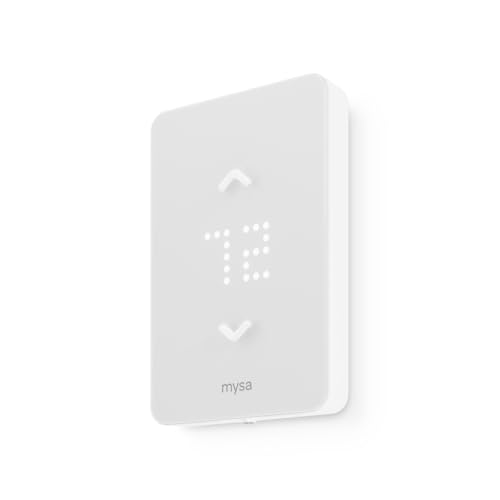
The Mysa Smart Thermostat LITE is designed for electric baseboard heating and offers substantial energy savings with in-app scheduling. It supports HomeKit, Alexa, and Google Assistant for voice control and remote management. This option is ideal for homes using electric baseboard or zone heating and for users who want direct control through multiple voice ecosystems.
Best for: Electric-baseboard heating setups needing precise control. Limitation: Primarily intended for electric heat zones, not centralized HVAC in all cases.
Buying Guide
What should you consider when choosing a heat-only smart thermostat?
- System compatibility: Confirm your heating type (gas, electric, heat pump, boiler) and whether a C-wire is required or optional for each model. Use the manufacturer’s compatibility checker when available.
- Wiring needs: Some models operate on a C-wire; others can work without one but may have reduced functionality. Plan wiring before installation.
- Smart-home integration: If you rely on Alexa, Google Assistant, or Apple HomeKit, verify which ecosystems each thermostat supports and whether it can act as a hub for routines or scenes.
- Energy-saving features: Look for scheduling flexibility, geofencing, occupancy detection, and energy reports. ENERGY STAR certification is a helpful indicator.
- Ease of installation: DIY-friendly units typically include built-in levels and clear step-by-step instructions. A model with a straightforward app experience can speed setup.
- Privacy and data handling: Some models emphasize privacy protections or data controls. Review how data is stored and shared.
- Future-proofing: Software upgrades and compatibility with new home ecosystems or local rebates can extend the thermostat’s usefulness.
Practical tip: rebates and incentives
Several models mention rebates from energy providers. Before buying, check local programs and whether the thermostat qualifies for any incentives in your area. Rebates can offset installation costs and improve long-term savings.
What to ask before purchase
- Is there a C-wire in my current thermostat wiring, and will the system operate without one?
- Which smart-home ecosystem do I primarily use, and does the device support it?
- Do I want multi-room control or room-based zoning for better comfort and savings?
- What energy-savings percentage is realistic for my heating system and usage patterns?
FAQ
- Do heat-only smart thermostats work with both traditional furnaces and heat pumps?
Most models support conventional heating; some require a dedicated wire or adapter for heat pumps. Check compatibility before purchasing.
- Will these thermostats save money on energy bills?
Yes, by managing heating schedules, occupancy, and temperature setpoints. Savings vary by home, usage, and system type.
- Is professional installation needed?
Many are designed for DIY installation with clear instructions. If your wiring is uncertain, consider professional help.
- Can I use voice assistants with these thermostats?
Yes, most support major ecosystems like Alexa, Google Assistant, or Apple HomeKit either directly or through the hub.
- Do these thermostats require a specific app?
Yes, most use the manufacturer’s app for setup, scheduling, and remote control, with some offering additional features via the app.